

Import Readwise highlights as sources for your book
Choose books, articles, and podcasts from your Readwise library and bring their highlights and notes into a Scribora project as source material.
What the Readwise import does
The Readwise import turns highlights you have already saved in Readwise into source material for a Scribora project. You choose specific books, articles, podcasts, tweets, or supplementals from your Readwise library, and Scribora imports the highlights and notes of those sources only. It never imports a whole library on its own.
Imported highlights become ordinary project sources, next to your notes, links, and uploaded files. They go through the same Analyze, Outline, and Write steps as everything else in the project and serve as research for your own nonfiction writing.
Highlights are other authors' words. Treat them as research, and check quotations and attribution before you publish, as you would with any source.
Import highlights step by step
- 1
Open the Readwise tile
On the project page, the Sources card has a Readwise tile. Select Import to open the import dialog.
- 2
Paste your Readwise access token
Readwise issues a personal access token at readwise.io/access_token. Paste it and select Load library. Scribora checks the token with Readwise and lists your library, most recently highlighted first.
- 3
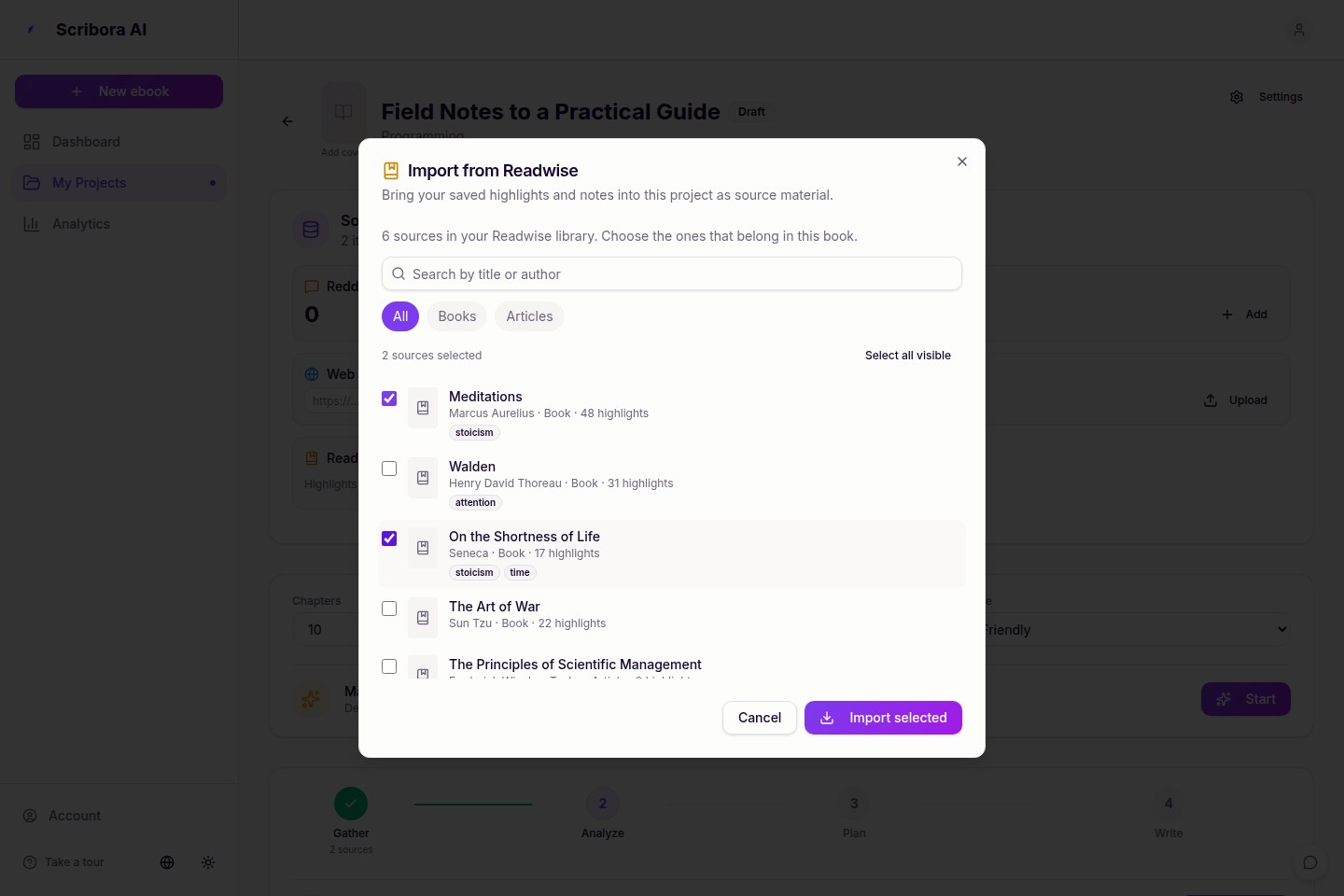
Choose the sources for this book
Search by title or author, filter by category, and tick the sources that belong in this project. Each entry shows its author, category, and number of highlights. Nothing is imported until you choose.
- 4
Import the selection
Select Import selected. Each chosen source appears in the Readwise section of the Sources card with its author, category, a preview, and a link to the original when Readwise has one. You can delete any of them there.
- 5
Analyze your sources
If the project has not been analysed yet, select Analyze in the workflow. If it has, select Re-analyze Sources on the Source analysis card. Either way the analysis is rebuilt from the project's current, included sources, so the imported highlights are analysed with the rest of its material and feed the outline and the chapters.
What gets imported
- One project source per Readwise book, article, podcast, or other document, not one per highlight. A book with two hundred highlights is a single source.
- Each source holds your document note, if there is one, then every highlight in reading order with its note directly beneath it. Highlights and notes are copied verbatim: nothing is summarised, reworded, or shortened.
- Your notes are marked "Note:" so the analysis can tell your own thinking apart from the author's words.
- Highlights you deleted or discarded in Readwise are left out. A selected source with no highlights or notes is skipped, and the import says how many were skipped.
- The title and author come from Readwise. When Readwise has the original web address of an article, it becomes the source's link. Private readwise.io links are never used as a source's link, so they cannot appear in the book's list of sources.
- One import takes up to 100 sources. The import runs while you wait, so a single run is capped; import a larger selection in several rounds.
Your Readwise token is not stored
Readwise connects through a personal access token rather than a sign-in flow. Scribora uses the token only while it loads your library or runs the import, sends it only to Readwise's API, and then discards it. The token is not saved in Scribora's database, project settings, cookies, or browser storage, and it is not written to logs or analytics.
Because nothing is kept, you paste the token each time you import, and Scribora has no ongoing access to your Readwise account afterwards.
Importing again
Importing a source that is already in the project never duplicates it. If its highlights or notes changed in Readwise since the last import, the existing source is updated in place; if nothing changed, it is left as it is. After an update, select Re-analyze Sources on the Source analysis card so the new material reaches the outline.
If every highlight and note of an imported source has since been deleted or discarded in Readwise, or the source itself was deleted there, importing it again removes it from the project's sources, and the import says how many sources it removed. Re-analyze afterwards so the removed material also leaves the analysis that the outline and chapters draw on; the same applies when you delete an imported source yourself.
There is no automatic sync. Scribora reads from Readwise only when you import, and it never writes to your Readwise account. Deleting an imported source removes it from the project only; it stays in Readwise and can be imported again.
Ready to use the workflow?
Start with a real source set. Scribora is most useful when you already have material worth turning into a book.